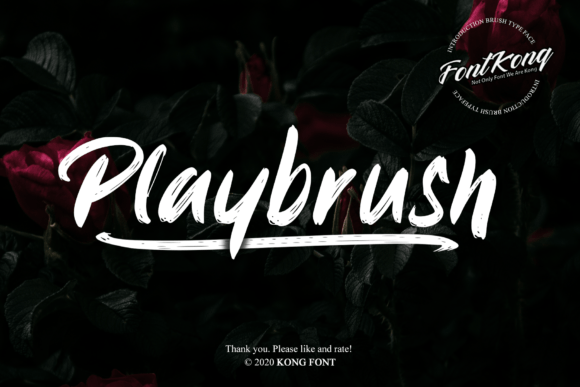
Playbrush: A Modern Handwritten Font for Creative Projects
As I opened a new brand board in Adobe Illustrator, I felt the familiar rush of excitement and possibility. Today, I was testing Playbrush, a modern and cool handwritten font, to see how it would fit into a boutique skincare line I was designing. The project required a playful yet sophisticated touch, and I had high hopes that Playbrush could deliver.
First Impressions: Playful and Inviting
The first thing that struck me about Playbrush was its lively, hand-drawn quality. The strokes are fluid and organic, with a casual, almost whimsical feel. This makes it perfect for projects that need a personal, human touch. I started by drafting a logo concept, and the font immediately added a friendly, approachable vibe to the design.
Logo Design: Standing Out with Personality
In the logo, Playbrush stood out as a unique and memorable choice. The playful curves and natural flow of the letters made the brand name feel like a personal signature. I experimented with a few different layouts, and the font's versatility allowed for both horizontal and stacked arrangements, which is always a plus in logo design.
Brand Identity: Consistency and Charm
Moving on to the brand identity, I created a series of mockups for business cards, packaging, and social media graphics. Playbrush maintained its charm across all these elements, providing a consistent and recognizable look. The font's playfulness was especially effective on the product labels, where it added a touch of personality to the minimalist design.
Packaging and Product Labels: Eye-Catching and Engaging
For the packaging, I used Playbrush for the product names and key messaging. The font's readability at larger sizes was excellent, making it easy to catch the eye from a distance. However, I did notice that at smaller sizes, the handwritten style could become a bit less legible, so I opted for a clean sans serif font for the ingredient lists and other detailed information.
Social Media and Web Design: Dynamic and Engaging
When it came to social media and web design, Playbrush truly shone. I used it for headlines and short phrases, where its playful nature added a dynamic and engaging element. For the website, I incorporated Playbrush in the hero section and call-to-action buttons, creating a visually appealing and inviting experience. The font's compatibility with tools like Photoshop and Silhouette Design Studio made it easy to integrate into various design assets.
Font Pairing and Practical Considerations
To balance the playful energy of Playbrush, I paired it with a clean, modern sans serif font for body text and longer paragraphs. This combination provided a good mix of personality and readability, essential for maintaining a professional and polished look. Before finalizing the designs, I also reviewed the included styles, alternates, and ligatures, which added a nice touch of customization and flexibility.
One practical note: Always check the commercial licensing before using Playbrush in client work, especially for brand identity, packaging, and digital products. While Playbrush is a freebie, it's important to ensure you have the right permissions for your specific use case.
In conclusion, Playbrush is a fantastic choice for creative projects that need a modern, handwritten touch. Its playfulness and versatility make it a valuable addition to any designer's toolkit, particularly for branding, packaging, and social media graphics. Just be mindful of its readability at smaller sizes and consider pairing it with a more legible font for longer text. Happy designing!